
1. Overview
A system of markers or text that identifies different parts of an exhibit.
Name
- AR Labelling
Intent
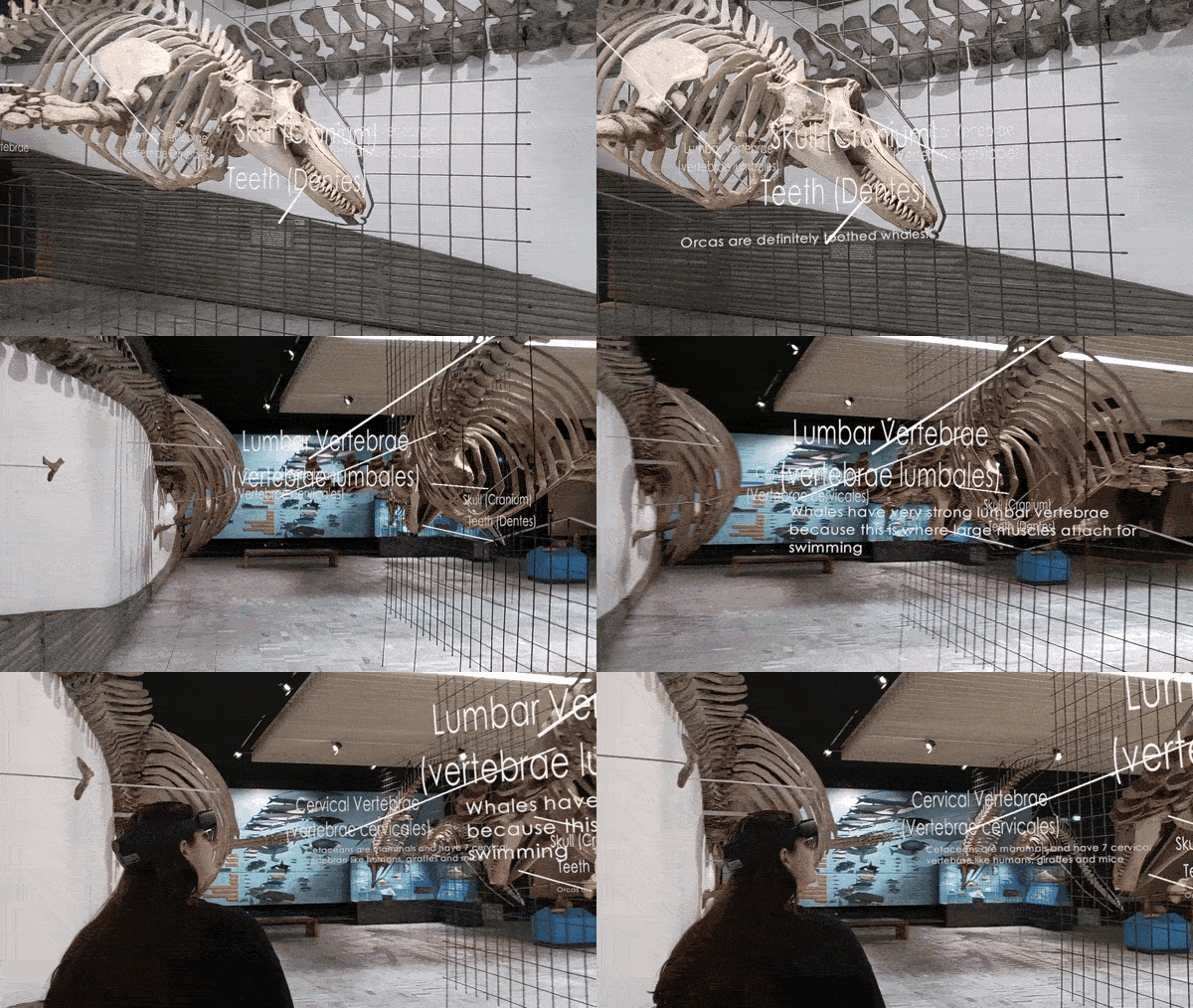
Help visitors identify and learn about individual parts or components of an exhibit in a space-constrained environment by linking visual labels to physical elements and revealing detailed explanations on approach.
2. Target
Problem
Visitors are unable to access detailed knowledge about specific parts or components of an exhibit due to spatial constraints in the exhibition area.
Context
- Exhibits often consist of multiple parts or components.
- Exhibition spaces may be too tight to provide physical labels or panels for every element.
- AR can overlay lightweight, context-sensitive labels in situ.
Use When
- Visitors engage an AR “explanation” mode for component-level detail.
- An exhibit includes several discrete parts but the physical footprint is limited.
Forces
- Clarity vs. Clutter: Labels must be visible without overwhelming the scene.
- Precision vs. Responsiveness: Pointing lines and proximity triggers must align accurately with components.
- Engagement vs. Distraction: Detailed text should appear only on demand.
Consequences
Weaknesses:
- Mis-alignment or sensor inaccuracy can lead to confusion; too many labels may distract if not hidden promptly.
Strengths:
- Visitors gain targeted information; AR labels stay out of the way until needed.
3. Application
Solution
1. Pointing Line
- Render a thin, anchored line from each exhibit part/component to its virtual label.
2. Title Text
- Place a concise title next to each line’s endpoint, using legible typography and contrasting background.
3. Proximity Trigger
- Employ a distance sensor (or bounding-box check) around each title: when the user comes within ~1.5 m, fire the explanation.
4. Conditional Explanation Display
- On trigger: fade in a detailed overlay panel describing the part (function, history, specifications).
- On exit: fade out the panel and leave only the title and line visible.
Rationale
- Pointing lines create a direct visual association between physical components and their explanations, while proximity-based reveals prevent information overload and preserve the exhibit’s visual integrity.
Design Parameters
- Line Thickness: 1–2 cm
- Title Distance: 0.2–0.8 m from component in 3D space
- Trigger Radius: 1.2–3 m around title anchor
- Fade Duration: 0.5 s for panel in/out
Example
In an AR-enhanced exhibit of a historical artifact, visitors see lightweight virtual labels connected to different components by thin pointing lines. When they move closer to one of the labels, a more detailed explanation panel appears, describing the part’s function and historical relevance. As they step away, the panel fades out again, leaving only the concise label visible so that the scene remains readable and uncluttered.
Notes
This pattern supports enhanced visitor engagement by delivering contextual, space-efficient information tailored to user interest and proximity.
Related Patterns:
- Step-In Circle: Labelling may follow Step-In Circle when the visitor first needs to intentionally activate the AR explanation mode at an exhibit.
- Sequential Explanation: Labelling can complement Sequential Explanation by shifting from a broad, structured overview to detailed information about specific components.
- Avatar Guide: Avatar Guide may bring visitors to the exhibit before Labelling begins, especially in multi-stop museum tours.
- AR Exhibit Reassembler: Labelling can support reassembly tasks by identifying parts and helping visitors understand how components relate to the complete artifact.
Team
- Yu Liu – Researcher and AR Designer/Developer
- Dr. Ulrike Spierling – Principal Investigator
Partners

Related Resources
-
Directional Audio Navigation Cues
1. Overview Pattern Level: Sub-pattern of Audio-First Dual-Mode NavigationPrimary Phase: GuidingOne-line Summary: A navigation mechanism that plays periodic spatially positioned musical cues derived from each character’s theme, giving players directional…
-
Character-Triggered Layer Transition
1. Overview Pattern Level: High-levelPrimary Phase: Cross-phaseOne-line Summary: A layer switching mechanism that transitions the player to a different content layer when they complete an encounter with a designated portal…
-
Orientation-Based Combat
1. Overview Pattern Level: High-level Primary Phase: PresentingOne-line Summary: A challenge mechanic that uses head orientation tracking to let players evade spatially positioned threats, turning the same sensing infrastructure used for…
-
Head-Directed Target Locking
1. Overview Pattern Level: Sub-pattern of Audio-First Dual-Mode NavigationPrimary Phase: GuidingOne-line Summary: A target selection mechanism that locks onto a navigation target when the player maintains head orientation toward it…
-
Progressive Proximity Audio Zones
1. Overview Pattern Level: Sub-pattern of Audio-First Dual-Mode NavigationPrimary Phase: PresentingOne-line Summary: A zone-based audio system that transitions players from silence through character music to narrative dialogue as they physically…
-
Audio-First Dual-Mode Navigation
1. Overview Pattern Level: High-levelPrimary Phase: Cross-phaseOne-line Summary: A navigation system that automatically separates exploration and content delivery into two distinct modes, preventing navigation audio and character audio from competing…


