
1. Overview
An interactive sketch tool that lets visitors highlight or trace exhibit features.
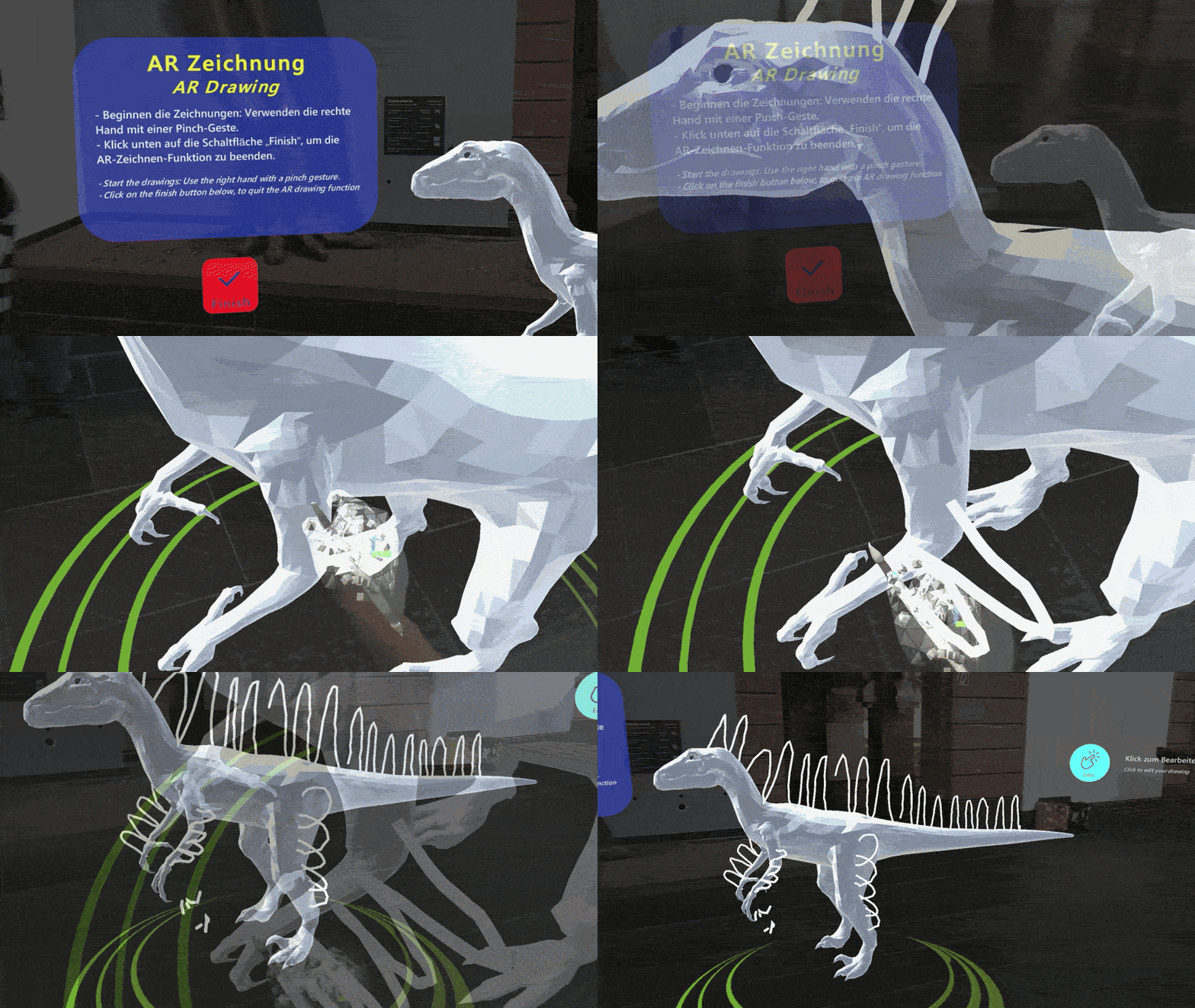
Name
- AR Exhibit Feature Drawing
Intent
Invite visitors to co-create and explore speculative or contested exhibit details through freehand AR sketching and comparison with expert models.
2. Target
Problem
Static presentations of speculative or partially unknown exhibit features limit engagement and creative interpretation.
Context
- Exhibits rely on hypotheses or evolving consensus (feather morphology, extinct coloration, reconstruction details).
- AR can overlay an interactive canvas directly on or around 3D models.
- Visitors benefit from hands-on, creative engagement.
Use When
- Scientific or historical details are hypothetical or debated.
- The exhibit’s goal is to spark visitor contribution, debate, and interpretation.
Forces
- Openness vs. Accuracy: Balancing creative freedom with scientific fidelity
- Accessibility vs. Complexity: Making drawing intuitive without overwhelming novices
- Persistence vs. Ephemerality: Deciding whether visitor sketches remain session-only or contribute to a shared gallery
- Feedback Timeliness: Providing real-time stroke feedback without latency
Consequences
Weaknesses:
- Poor drawing controls can frustrate visitors; conflicting community sketches may confuse rather than clarify.
Strengths:
- Deepens engagement, fosters ownership and discussion, makes science participatory.
3. Application
Game Mechanics
- Type: Drawing
- Freehand Drawing: Freely draw ideas on or around the exhibit.
- Feature Customization: Adjust feature options to match scientific findings or imagination.
- Feedback Integration: Provide comparisons with existing assumptions or highlight accuracy.
- Progressive Exploration: Guide visitors to different parts of the exhibit for additional challenges.
Solution
1. Freehand & Pinch-Gesture Drawing
- Provide a spatial canvas around or directly on the 3D exhibit model.
- Enable mid-air strokes for sketching details (feathers, textures) and pinch gestures to adjust brush size or erase.
2. Feature Customization Toolkit
- Offer adjustable brush size, opacity, and a scientific-theory–inspired palette.
- Include layering and undo/redo for refinement.
3. Start-Point Guidance & Prompt Zones
- Highlight recommended areas (e.g., wing surfaces, crests) with subtle markers.
- Display a brief on-screen prompt explaining how to begin.
4. Feedback & Comparative Overlay
- Show real-time visual feedback for stroke accuracy and depth placement.
- Provide a toggle to overlay expert or consensus reconstructions for side-by-side comparison.
5. Creative Interpretation Gallery
- On completion, allow visitors to save their designs to a shared AR gallery.
- Cycle through community submissions on a virtual wall to encourage discussion.
Rationale
- Allowing visitors to actively sketch hypotheses turns passive observation into participatory science, making speculative details tangible and fostering deeper curiosity and debate.
Design Parameters
- Brush Sizes: 1–10 cm virtual width, adjustable via pinch span.
- Opacity Levels: 20–100% in 10% increments.
- Color Option: Provide colours that correspond to the characteristics of the exhibition.
Example
At a dinosaur exhibit, visitors are invited to explore how certain anatomical features may have appeared based on scientific interpretation. After activating the AR mode, they use mid-air drawing to sketch feathers or surface details onto the virtual reconstruction. Subtle prompts indicate recommended drawing regions, and an optional comparison overlay lets them compare their own sketch with an expert-informed reconstruction. This turns uncertain scientific knowledge into an interactive, reflective experience rather than a fixed visual claim.
Notes
This pattern elevates visitors from passive observers to active co-interpreters, fostering dialogue around uncertain scientific narratives and nurturing creative thinking.
Related Patterns:
- Avatar Guide: Avatar Guide can bring visitors to the relevant exhibit before the drawing activity starts, especially in guided museum journeys.
- Step-In Circle: Step-In Circle can provide a simple activation method for entering the drawing experience without requiring complex menu navigation.
- Sequential Explanation: A short sequential explanation can introduce the scientific background or uncertainty surrounding the feature before visitors begin drawing.
- Labelling: Labelling can be used alongside the drawing activity to identify the relevant body parts or exhibit regions that visitors are invited to interpret.
Team
- Yu Liu – Researcher and AR Designer/Developer
- Dr. Ulrike Spierling – Principal Investigator
Partners

Related Resources
-
Directional Audio Navigation Cues
1. Overview Pattern Level: Sub-pattern of Audio-First Dual-Mode NavigationPrimary Phase: GuidingOne-line Summary: A navigation mechanism that plays periodic spatially positioned musical cues derived from each character’s theme, giving players directional…
-
Character-Triggered Layer Transition
1. Overview Pattern Level: High-levelPrimary Phase: Cross-phaseOne-line Summary: A layer switching mechanism that transitions the player to a different content layer when they complete an encounter with a designated portal…
-
Orientation-Based Combat
1. Overview Pattern Level: High-level Primary Phase: PresentingOne-line Summary: A challenge mechanic that uses head orientation tracking to let players evade spatially positioned threats, turning the same sensing infrastructure used for…
-
Head-Directed Target Locking
1. Overview Pattern Level: Sub-pattern of Audio-First Dual-Mode NavigationPrimary Phase: GuidingOne-line Summary: A target selection mechanism that locks onto a navigation target when the player maintains head orientation toward it…
-
Progressive Proximity Audio Zones
1. Overview Pattern Level: Sub-pattern of Audio-First Dual-Mode NavigationPrimary Phase: PresentingOne-line Summary: A zone-based audio system that transitions players from silence through character music to narrative dialogue as they physically…
-
Audio-First Dual-Mode Navigation
1. Overview Pattern Level: High-levelPrimary Phase: Cross-phaseOne-line Summary: A navigation system that automatically separates exploration and content delivery into two distinct modes, preventing navigation audio and character audio from competing…


