
1. Overview
A step-by-step interface for exploring exhibit information in order.
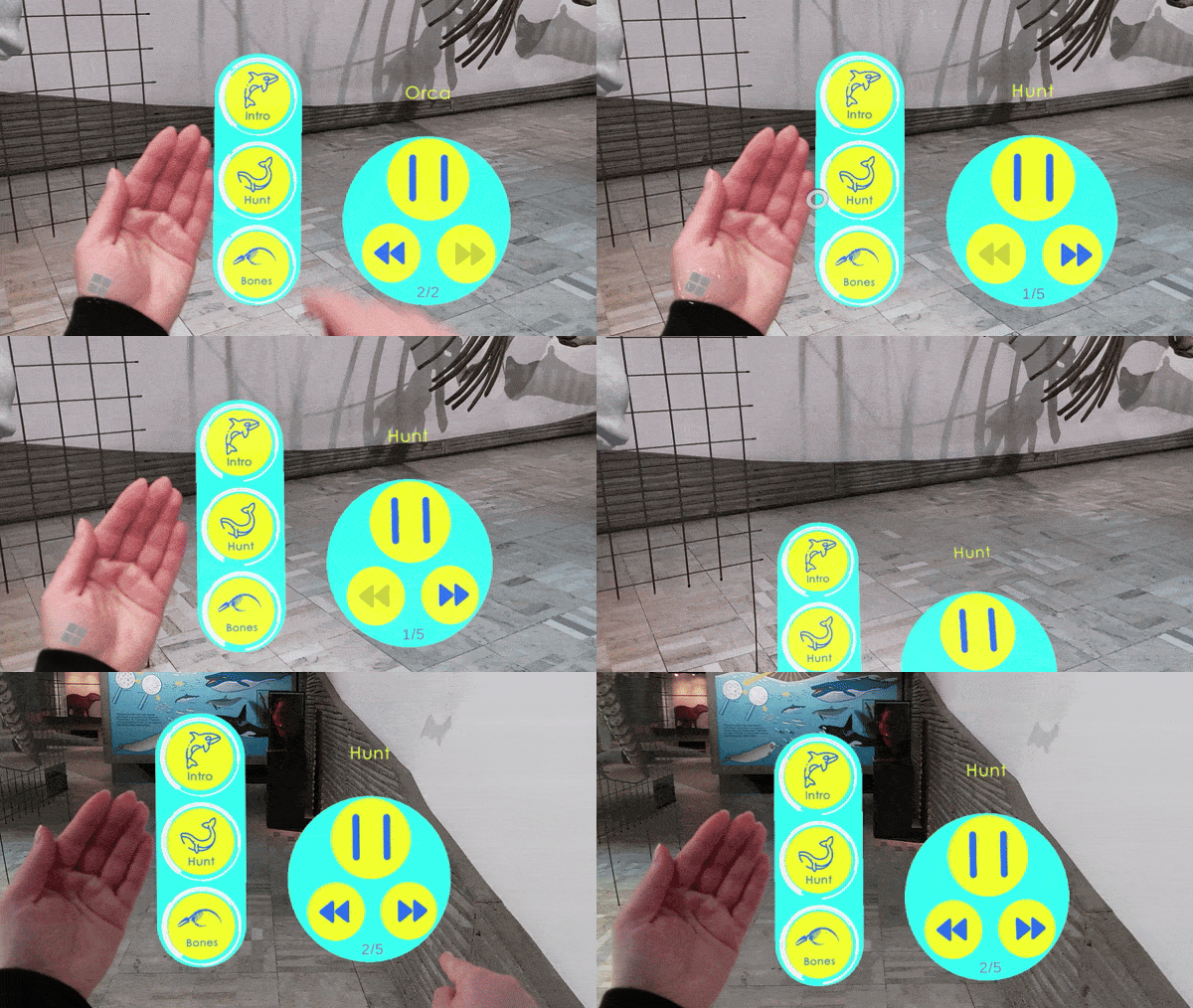
Name
- Sequential Explanation
Intent
Present exhibit information in logical categories and let visitors explore at their own pace using clear navigation controls.
2. Target
Problem
Visitors struggle to understand multiple categories of information and may feel overwhelmed or miss key details without structured guidance.
Context
- Exhibits encompass multiple information categories or numerous data points.
- AR feature already activated, ready to display digital content.
- Visitors require a comfortable, self-paced exploration flow.
Use When
- Visitors have engaged the exhibit’s AR information feature.
- A comprehensive, tiered presentation of content is needed.
- Users benefit from explicit controls to move between sections.
Forces
- Cognitive Load: Balancing depth of content with visitor attention span.
- Pacing Control: Allowing users to linger or skip ahead.
- Spatial Context: Ensuring UI elements don’t obstruct the exhibit.
- Consistency: Maintaining a uniform navigation model across categories.
Consequences
Weaknesses:
- Overly linear flow may frustrate visitors seeking serendipitous discovery; UI elements may distract if poorly placed.
Strengths:
- Clear mental model of content structure; users feel in control.
3. Application
Solution
1. Exhibit Information Categorization
- Break down all content into distinct categories (e.g., History, Function, Fun Facts).
- Display a set of buttons or tabs—one per category—at the top or side of the view.
2. Detailed Exhibit Explanation
- Within each category, present information panels sequentially: images, text, 3D models, or video.
- Highlight key visual components (e.g., animate structural parts) and play aligned audio narration.
3. Navigation Controls
- Provide “Previous” and “Next” buttons to move between panels.
- Optionally show a progress indicator or step count (e.g., “2 of 5”).
4. Category Indicators
- Always display the active category title prominently.
- Hide inactive categories to maintain focus.
5. Control for Animated Content
- For any looping animation or video, include “Pause” and “Resume” controls.
- Auto-pause when users navigate away, auto-resume if they return.
Rationale
- Structuring content into bite-sized, thematically grouped segments reduces overwhelm and gives visitors agency to explore at their own speed, improving comprehension and retention.
Design Parameters
- Categories: 3–6 per exhibit to balance breadth and simplicity
- Button Size: ≥ 10cm /tap target for easy selection
- Progress Indicator: Show step count (e.g., “Step 1/4”) or progress bar
Example
At a natural history exhibit, visitors activate the AR information section and are presented with a sequence of short content panels about the exhibit. They first see a brief introduction, then move through categories such as habitat, anatomy, and scientific significance using Previous and Next controls. Supporting images, 3D highlights, and optional narration help them follow the content step by step at their own pace without being overwhelmed by too much information at once.
Notes
This pattern supports structured, self-directed exploration by guiding visitors through categorized exhibit information at their own pace, enhancing comprehension and engagement.
Related Patterns:
- Step-In Circle: Sequential Explanation commonly follows Step-In Circle, which provides an explicit and embodied way for visitors to activate the explanation flow.
- Avatar Guide: Avatar Guide may lead visitors to the exhibit before the explanation begins, but the guide itself remains separate from the content presentation logic.
- Labelling: Sequential Explanation can be combined with Labelling when the visitor first receives a structured overview and then explores individual exhibit parts in more detail.
- AR Exhibit Reassembler and AR Exhibit Feature Drawing: After a sequential introduction, visitors may transition to interactive patterns that allow them to apply or explore what they have learned through playful engagement.
Team
- Yu Liu – Researcher and AR Designer/Developer
- Dr. Ulrike Spierling – Principal Investigator
Partners

Related Resources
-
Directional Audio Navigation Cues
1. Overview Pattern Level: Sub-pattern of Audio-First Dual-Mode NavigationPrimary Phase: GuidingOne-line Summary: A navigation mechanism that plays periodic spatially positioned musical cues derived from each character’s theme, giving players directional…
-
Character-Triggered Layer Transition
1. Overview Pattern Level: High-levelPrimary Phase: Cross-phaseOne-line Summary: A layer switching mechanism that transitions the player to a different content layer when they complete an encounter with a designated portal…
-
Orientation-Based Combat
1. Overview Pattern Level: High-level Primary Phase: PresentingOne-line Summary: A challenge mechanic that uses head orientation tracking to let players evade spatially positioned threats, turning the same sensing infrastructure used for…
-
Head-Directed Target Locking
1. Overview Pattern Level: Sub-pattern of Audio-First Dual-Mode NavigationPrimary Phase: GuidingOne-line Summary: A target selection mechanism that locks onto a navigation target when the player maintains head orientation toward it…
-
Progressive Proximity Audio Zones
1. Overview Pattern Level: Sub-pattern of Audio-First Dual-Mode NavigationPrimary Phase: PresentingOne-line Summary: A zone-based audio system that transitions players from silence through character music to narrative dialogue as they physically…
-
Audio-First Dual-Mode Navigation
1. Overview Pattern Level: High-levelPrimary Phase: Cross-phaseOne-line Summary: A navigation system that automatically separates exploration and content delivery into two distinct modes, preventing navigation audio and character audio from competing…


