
1. Overview
A personable virtual companion that leads visitors through exhibits at a comfortable pace.
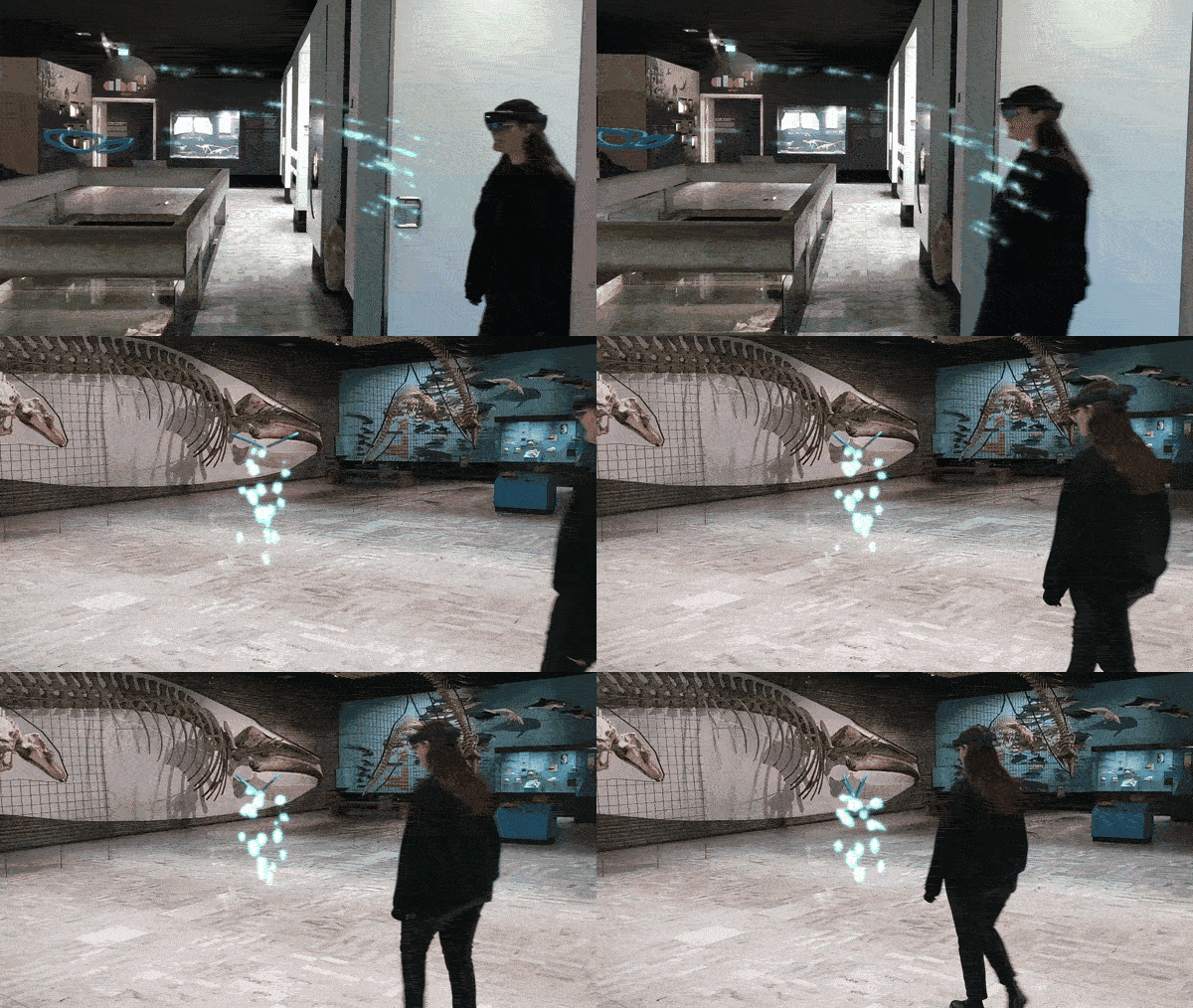
Name
- Avatar Guide
Intent
Provide a personable, pace‐regulated virtual companion that users naturally follow through a physical environment, enhancing orientation and thematic immersion beyond traditional wayfinding cues.
2. Target
Problem
In AR-enhanced museum settings, guests can miss salient points of interest despite a preconfigured route, and planar indicators offer limited guidance for regulating walking pace or maintaining orientation when attention is divided among exhibits.
Context
- Multiple points of interest dispersed across a nontrivial floor plan
- Real-time user localization accurate enough to anchor and animate a virtual figure in situ
- Desire for a more personable, dramaturgical companion experience than abstract wayfinding cues allow
Use When
- Visitors prefer to “follow” a guide rather than decode symbolic markers.
- Maintaining a natural, steady walking pace is important for comfort.
- The venue wants to embody thematic or narrative elements (e.g., a curator avatar or historical persona).
- The system must adjust pacing dynamically without manual speed controls.
Forces
- Attention Split: Balancing user focus between exhibits and navigation.
- Pacing: Ensuring a comfortable, consistent walking speed.
- Orientation: Preventing users from veering off the intended route.
- Realism vs. Performance: Keeping animations plausible without overloading device resources.
Consequences
Weaknesses:
- Potential uncanny-valley effects if avatar animations feel artificial; reliance on localization accuracy.
Strengths:
- Increased engagement, clearer navigation, stronger thematic immersion.
3. Application
Solution
1. Avatar & Path
- Spawn a 3D avatar at the user’s position; bind its movement to the authored path.
- Monitor heading and speed; adjust the guide’s velocity to maintain a 2–3 m following distance.
- Pace & comfort: Walking speed adapts to the visitor (default 1.0 m/s, range 0.8–1.2 m/s) so the guide never pulls away. In crowded or narrow areas, shorten the following distance and slow slightly to keep things comfortable and safe.
2. Kinematic Plausibility
- Use inverse-kinematics and idle animations when paused or off-course.
- The avatar’s animation speed scales with movement speed; or use a color-coded outline/attire to reflect navigation states (e.g., green = en route, amber = paused).
- Smoothness: Avoid sudden starts/stops; keep turns and stops gentle so movement feels natural.
3. Point-of-Interest Menu
- Floating radial or list menu for selecting the next destination.
- Display estimated travel time based on the adaptive speed profile.
- Placement: Prefer environment-anchored placement (e.g., near the route start, at a stable waypoint, or a safe pull-over spot) to reduce gaze switching; hand-anchored is an optional quick-access variant when appropriate. Use large, readable targets and avoid occluding exhibits.
4. Gesture-Activated Controls
- Palm-up gesture reveals a mini hand-menu with Start, Pause, Resume, End.
- Haptic/audio confirmations for commands.
- Minimal & fallback: Keep commands minimal to avoid distraction; if gestures are unreliable, show a small environment-anchored panel with the same options.
5. Auditory & Spatial Prompts
- Spatialized vocal cues (“Turn left ahead”) and soft footstep sounds at decision points.
- Adjust volume/cadence in response to ambient noise and proximity.
- Accessible prompts: Pair audio with captions/icons and color-blind-safe indicators; repeat gently (e.g., every 6–10 s) so guidance is helpful, not intrusive.
6. Arrival Interaction
- Upon reaching a PoI, the avatar stops and provides clear visual feedback.
- Trigger an on-screen tooltip and brief chime to affirm arrival.
7. Composition
- Typical hand-off (optional): After confirming arrival, the avatar may hand over to Step-In Circle (activation) → Sequential Explanation/Labelling (content exploration).
- Separation of concerns: These are separate patterns; the avatar’s role is guiding and announcing arrival, not presenting content. Use hand-offs when they improve flow; otherwise the avatar can remain idle until the visitor is ready.
8. Failure & Fallback
- Lost or low-confidence tracking: The avatar stays within this pattern’s logic—enter a waiting state and display simple, non-intrusive ground/path cues. After a short timeout, ask the visitor whether to continue or end; do not auto-switch to other patterns.
- Crowded or narrow areas: Shorten following distance and reduce speed; stop at safe pull-over spots rather than blocking others.
- Hazards & restrictions: Avoid stairs/edges and non-public areas; suggest a nearby alternative PoI if the planned path is unsafe.
- Input fallback: If gestures fail, provide an environment-anchored control panel. End is always available for a clean stop.
- Quiet spaces: Cap audio volume and rely on captions/icons.
Rationale
- A personable guide leverages people’s tendency to follow, reducing the effort of interpreting arrows or maps.
- Adaptive pacing and comfortable following distance maintain flow across different visitors and room conditions.
- Keeping hand-offs optional and pattern roles distinct avoids overloading the guide with presentation duties.
- Staying in-pattern on loss (wait → gently prompt → ask) keeps the experience robust without surprising mode switches.
Design Parameters
- Following distance: 2–3 m (default 2.5 m; shorten in crowds or narrow aisles).
- Walking speed: default 1.0 m/s; adaptive range 0.8–1.2 m/s.
- Arrival radius: ≈ 2.0 m (adjust to safe standoff from exhibits).
- Prompt cadence: repeat gently every 6–10 s if needed; cap volume in quiet rooms.
- State indication: animation follows movement; optional outline/back beacon shows en-route / paused / recover (use color + icon for accessibility).
- Control/menu placement: environment-anchored by default (route start, stable waypoint, safe pull-over); hand-anchored optional for quick access; keep targets large and readable.
Example
In a natural history museum, visitors select a whale/dinosaur exhibit from a nearby AR menu. A virtual guide avatar then appears and walks ahead of them at an adaptive pace, maintaining a comfortable following distance. When the visitor reaches the destination, the avatar stops and signals arrival through animation and audio feedback. A Step-In Circle then appears on the floor in front of the exhibit, allowing the visitor to explicitly begin the next interaction stage, such as a sequential explanation or an interactive exhibit activity.
Notes
By anthropomorphizing wayfinding, the Avatar Guide reduces cognitive load and fosters social presence. Its adaptive pacing prevents visitor frustration caused by mismatched walking speeds, while gesture activated controls minimize visual clutter. The use of themed avatars can further reinforce the institution’s narrative identity.
Related Patterns:
- Step-In Circle: Often follows Avatar Guide by enabling visitors to explicitly activate an exhibit or point of interest once they arrive.
- Sequential Explanation: Can follow after activation when the system presents exhibit information step by step.
- Labelling: Can be combined after arrival when visitors need to inspect multiple parts of an exhibit in a structured way.
- Exhibit Reassembler and Feature Drawing: Can be launched after guided arrival when the destination point supports playful or hands-on AR interaction.
Team
- Yu Liu – Researcher and AR Designer/Developer
- Dr. Ulrike Spierling – Principal Investigator
Partners

Related Resources
-
Directional Audio Navigation Cues
1. Overview Pattern Level: Sub-pattern of Audio-First Dual-Mode NavigationPrimary Phase: GuidingOne-line Summary: A navigation mechanism that plays periodic spatially positioned musical cues derived from each character’s theme, giving players directional…
-
Character-Triggered Layer Transition
1. Overview Pattern Level: High-levelPrimary Phase: Cross-phaseOne-line Summary: A layer switching mechanism that transitions the player to a different content layer when they complete an encounter with a designated portal…
-
Orientation-Based Combat
1. Overview Pattern Level: High-level Primary Phase: PresentingOne-line Summary: A challenge mechanic that uses head orientation tracking to let players evade spatially positioned threats, turning the same sensing infrastructure used for…
-
Head-Directed Target Locking
1. Overview Pattern Level: Sub-pattern of Audio-First Dual-Mode NavigationPrimary Phase: GuidingOne-line Summary: A target selection mechanism that locks onto a navigation target when the player maintains head orientation toward it…
-
Progressive Proximity Audio Zones
1. Overview Pattern Level: Sub-pattern of Audio-First Dual-Mode NavigationPrimary Phase: PresentingOne-line Summary: A zone-based audio system that transitions players from silence through character music to narrative dialogue as they physically…
-
Audio-First Dual-Mode Navigation
1. Overview Pattern Level: High-levelPrimary Phase: Cross-phaseOne-line Summary: A navigation system that automatically separates exploration and content delivery into two distinct modes, preventing navigation audio and character audio from competing…


